What are Kula Teammates?
Last updated: September 25, 2026
Kula Teammates are AI agents that do parts of the hiring work for you — checking applicants for fake profiles, scoring applications against your criteria, and phoning candidates to book their interviews. They work inside your normal pipeline, on the jobs you choose, and everything they do is recorded on the candidate's record.
Who can do this: Super Admin and Admin turn teammates on for the organisation. Super Admin, Admin, and Recruiters with edit access to a job add teammates to that job.
Where to find it:Settings → AI Teammates (organisation) and Jobs
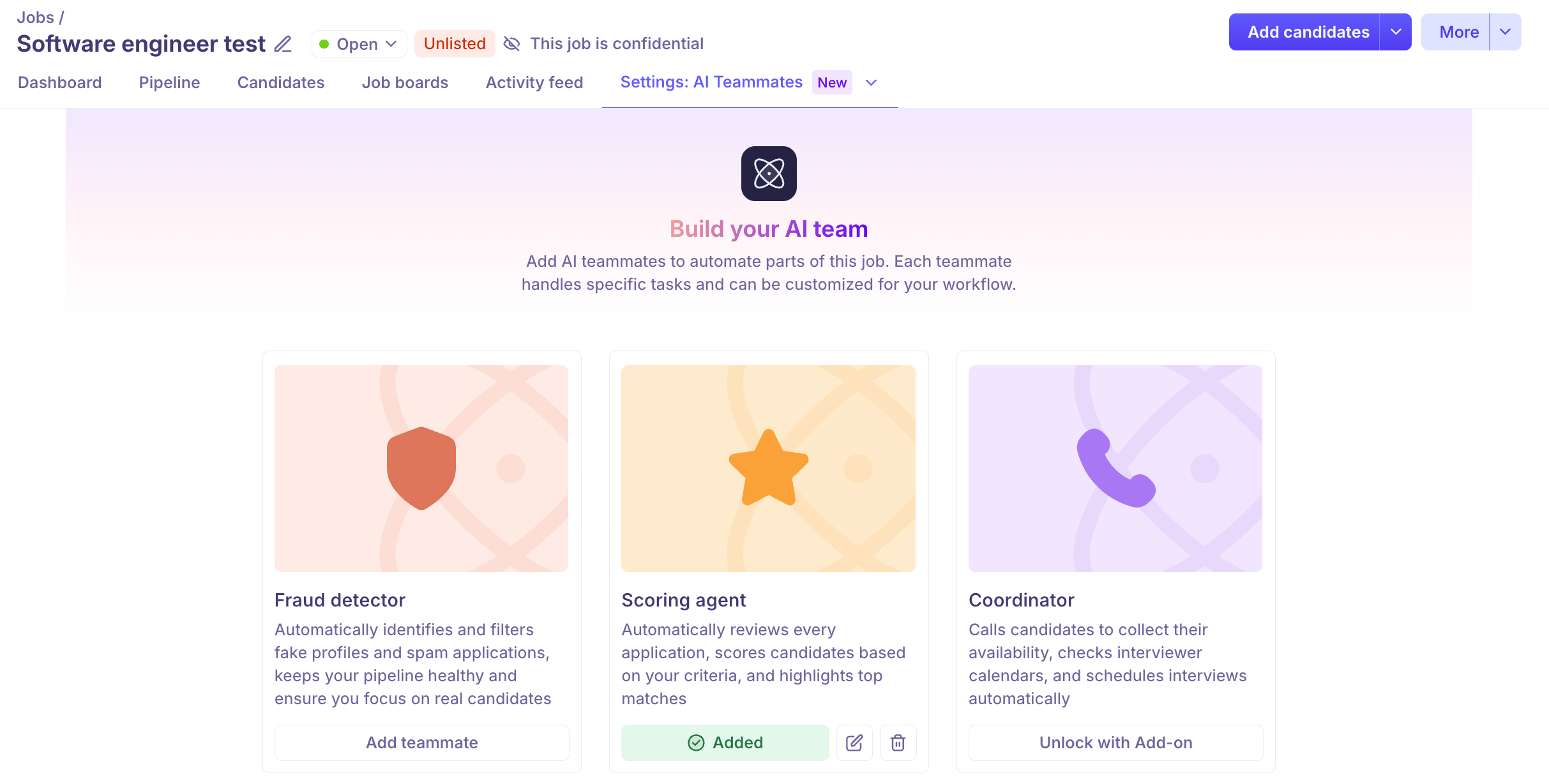
What each teammate actually does
Fraud detector
When a candidate applies, the Fraud detector monitors their application for fake email addresses, known fraud patterns and other suspicious activity. It returns one of three results: No issues, Inconclusive, or Suspicious, along with a written breakdown of what it found and why.
It does not reject anyone by itself unless you tell it to. You can leave every result for a human to look at, or set the job to reject Suspicious candidates automatically.
Scoring agent
The Scoring agent reads every application
Coordinator
The Coordinator telephones candidates. It introduces itself, asks when they're free, checks that against your interviewers' calendars, and books the interview — creating the calendar event and sending the invitations, all within the one call. If the candidate doesn't pick up it retries; if they ask to be called back later, it schedules that.
You can also let candidates ring the agent's number themselves to move an interview, and have it chase candidates who don't turn up.
Every call is recorded and transcribed, and both appear on the candidate's record afterwards.
Nothing runs until it's switched on in two places
This is the part that most often causes confusion. Every teammate has two independent switches, and both must be on.
Level | Who sets it | What it controls |
|---|---|---|
Organisation | Super Admin or Admin, in Settings → AI Teammates | Whether the teammate exists for your account at all, plus its shared setup — the Coordinator's name, voice and capabilities. |
Job | Anyone with edit access to the job, on the job's AI Teammates tab | Whether the teammate works on this job, and how it behaves here. |
A teammate that is enabled for your organisation but not added to a job does nothing on that job. This is deliberate: it means turning a teammate on for the account never causes it to start calling or rejecting people across your whole pipeline.
Reading the card on a job
The button at the bottom of each card tells you exactly where you stand.
What the card shows | What it means | What to do |
|---|---|---|
Add teammate | Enabled for your organisation and ready to set up here. | Click it and configure the teammate for this job. |
Unlock with Add-on | The Coordinator or Fraud detector isn't part of your plan yet. The button does nothing. | Contact Kula support to have the add-on enabled. |
Not enabled by admin | The Scoring agent isn't available on this job | Ask an admin. |
Added | Working on this job. | Pencil icon to change the setup, bin icon to remove it. |
The Fraud detector card also shows which mode it's running in — Automatic mode or Manual mode — so you can tell at a glance whether it's checking people on its own.
What teammates cost
Fraud detection costs 1 credit per candidate checked. That applies whether the check ran automatically or you ran it yourself, and a re-check on the same candidate costs another credit. When your balance is spent, checks stop and you'll see "Credit limit reached. Please contact your admin to add more credits."
The Coordinator uses credits per call, and credits are also what you spend to buy the phone numbers it calls from.
To find out how many credits you have left, ask Kula support.
Good to know
The Coordinator and the Fraud detector are add-ons. If a card shows Unlock with Add-on, the button genuinely isn't clickable — no amount of permission changes will help. Kula has to enable it for your account.
The Screener has no organisation-level settings page. Unlike the other two, it's configured entirely on each job.
Candidates are told when AI is involved. With the Fraud detector enabled, an AI usage disclaimer appears on your Kula career page when someone applies. Coordinator calls are recorded and transcribed.
You can remove a teammate from one job without affecting others. Use the bin icon on that job's card rather than the organisation setting.
FAQ
How do I unlock the Fraud Detector add-on? It's an add-on Kula enables per account, so it can't be turned on from inside the product. Message support through the in-app chat or email support@kula.ai. Once it's unlocked, an admin still has to switch it on in Settings → AI Teammates → Fraud detector before it appears on jobs.
I'd like to enable the Coordinator agent on my account. Can you help me get started? Same route — contact support to unlock the add-on. After that there are two setup steps before it can call anyone: an admin gives the agent a name, voice and capabilities, and buys at least one phone number.
Does the Coordinator call candidates on jobs where we never turned it on? No. It only calls on jobs where it has been added on that job's AI Teammates tab.
How many credits do we have left? Ask Kula support for your current balance.
Need help? If you have questions or need assistance, reach out to us at support@kula.ai or use the in-app chat.