Job approval workflows
Last updated: September 26, 2026
Job approval workflows let you require one or more reviewers to sign off on a job before it's published and opened to candidates. This is a separate gate from requisition approval: requisition approval reviews the need to hire before a job exists, while job approval reviews the job itself — its content, fields, and details — right before it goes live. See "Requisition approval workflows" if you're looking for the headcount-approval step instead.
Who can do this: Admin and Super Admin.
Where to find it: Settings → Job Approvals, to build and edit workflows. On an individual job, pending approval status and the approve/reject action appear directly on the job itself, and reviewers can also act from the notification they receive by Slack or email.
Setting up a workflow
Turn job approval on. Job approval is an on/off feature per organization — if it's off, jobs publish without a review step.
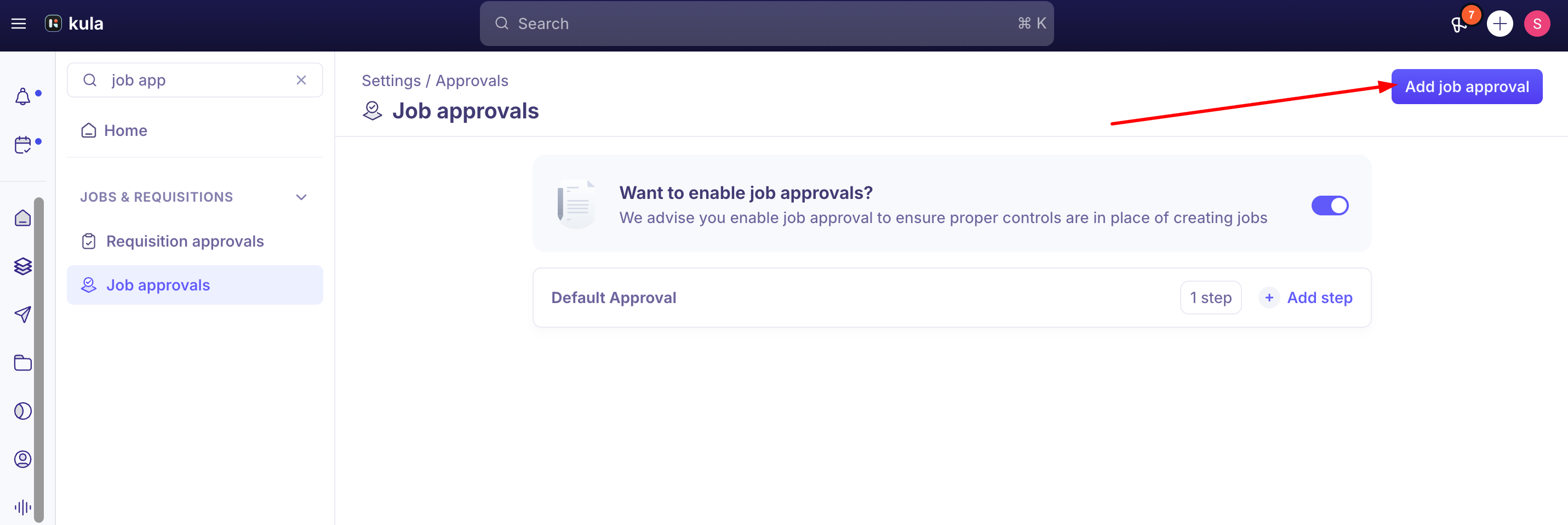
Build one or more approval steps. Each step names its reviewers and a condition for that step to pass.
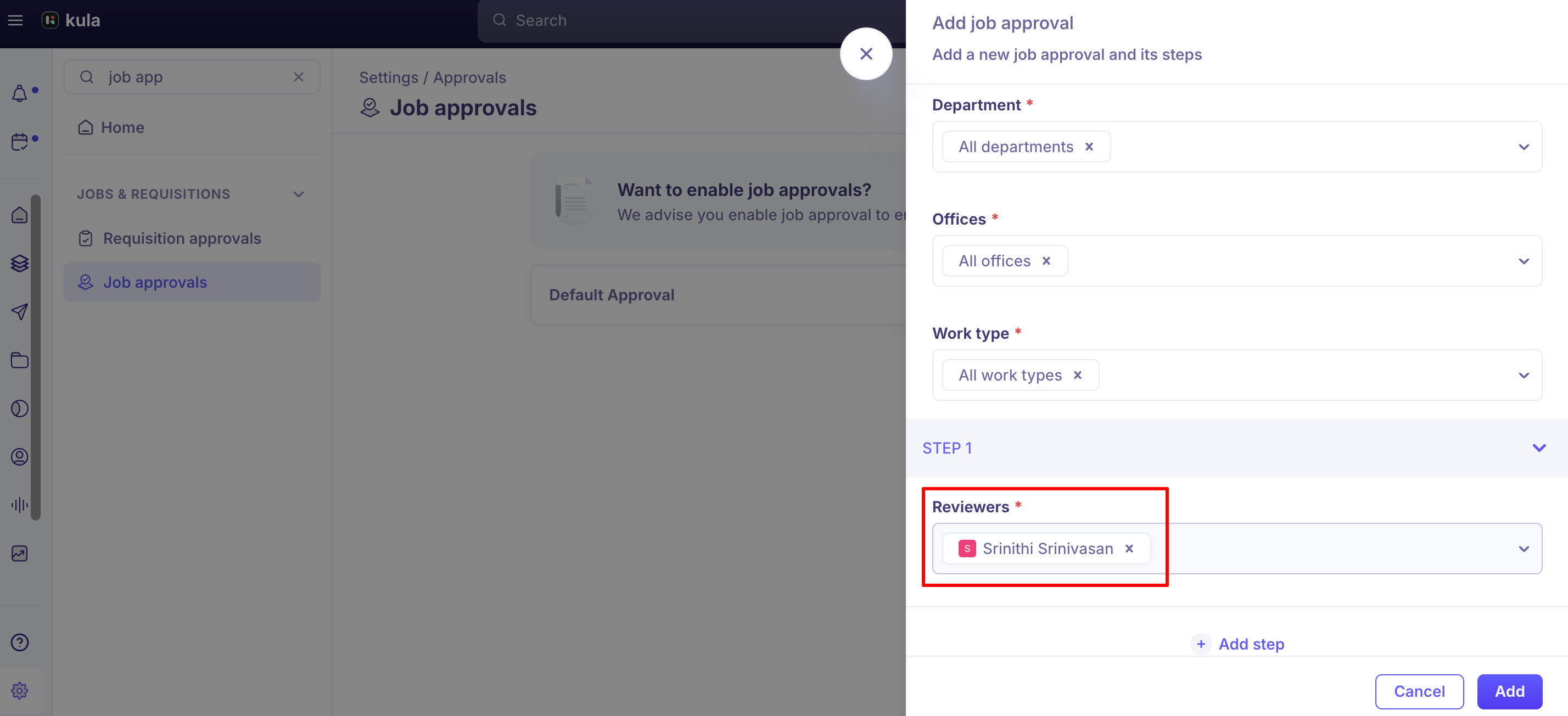
Add reviewers per step. You can add specific individual users, or dynamic roles that resolve based on the job — Hiring team (on job), Primary recruiter (on job), and Primary hiring manager (on job) are all selectable, so the same workflow definition automatically points at the right people for each job without needing a separate workflow per job.
Set each step's condition. Choose whether any one reviewer's approval is enough, or whether all reviewers on that step must approve before the step passes.
Require simultaneous (parallel) approval from multiple people by adding them all to the same step and requiring all of them to approve — for example, finance and a leadership approver reviewing together rather than one after another. Sequential, multi-stage review is achieved with separate steps instead, where each step must pass before the next one starts.
How approval works on a job
Once a workflow is active, a newly created job enters a Pending approval status and won't publish until every required step passes.
Reviewers are notified through whichever channels they have enabled — Slack, email, and/or in-app — and the notification includes the job's full field details along with Approve and Reject buttons embedded directly in it, so a reviewer can act from Slack or their inbox without logging into Kula. "Job Approval Requests" is treated as a critical notification type: Kula requires at least one channel to stay enabled for it, so it can't be fully muted.
Good to know
Reviewers can't be edited on a job once its approval request has already been sent. If you need to reassign an approver after that point, you'll need to work with support, or set up the correct approver before the job is submitted.
A Super Admin / Admin can approve on behalf of a deactivated or inactive reviewer. If a job is stuck waiting on someone who's left the organization, a Super Admin / Admin can step in and approve it directly rather than the job being permanently blocked — as long as at least one other active approver isn't also required by the step's condition.
Reopening a previously approved job resets approval from scratch. Kula doesn't retain a job's prior approval when it's republished — the full workflow runs again from the first step. The only account-level control is a single on/off toggle in Settings that applies to all jobs; there's currently no way to require approval for newly created jobs while exempting reopened ones.
Each individual opening requires its own approval (requisition / job), even when multiple headcount slots are created under the same parent role — approval isn't shared across openings.
There's no dedicated "visibility-only" or CC role yet for people who should be kept informed without being a real approver. This is a current, live gap: to give someone visibility today, they have to be added to an approval step alongside an actual approver, which means they receive the same approve/reject notifications even though they're not expected to act on them. A common workaround is putting them on a step with a real approver and requiring only that person's approval, so the added person is notified but doesn't gate anything.
FAQ
What's the difference between requisition approval and job approval? Requisition approval reviews and approves the need to hire before a job exists; once a requisition is approved and assigned to a recruiter, the resulting job can go through its own, separate job approval workflow before it's published.
Where do I create or edit a job approval workflow? Settings → Job Approvals.
Can I change who's reviewing a job after it's already been submitted for approval? No — once the approval request has gone out for that job, its reviewers can't be edited from that workflow. Reach out to support if a reassignment is genuinely needed.
Can two people approve a job at the same time instead of one after another? Yes — add both to the same approval step and require all reviewers on that step to approve. Putting them in separate steps instead makes the review sequential.
One of our approvers is no longer with the company — how do we get a stuck job unblocked? A Super Admin can approve on behalf of an inactive user directly.
Why is a job I already had approved asking for approval again? Kula doesn't carry a job's approval forward across a reopen — reopening and republishing a job restarts the full approval workflow.
Need help?
For approving headcount before a job is created, see "Requisition approval workflows." For how notifications for approvals (and everything else) can be routed across Slack, email, and in-app, see the Notification Center settings. For anything else, reach out to us at support@kula.ai or use the in-app chat.