Kula AI overview
Last updated: September 26, 2026
Kula uses AI in two ways. Kula Teammates are AI agents that work your pipeline: checking for fraud, scoring applications and scheduling interviews by phone. Other AI features help a person without acting on their own, such as interview notes and candidate summaries. This article lists every AI feature, what it does, and where to find the detail.
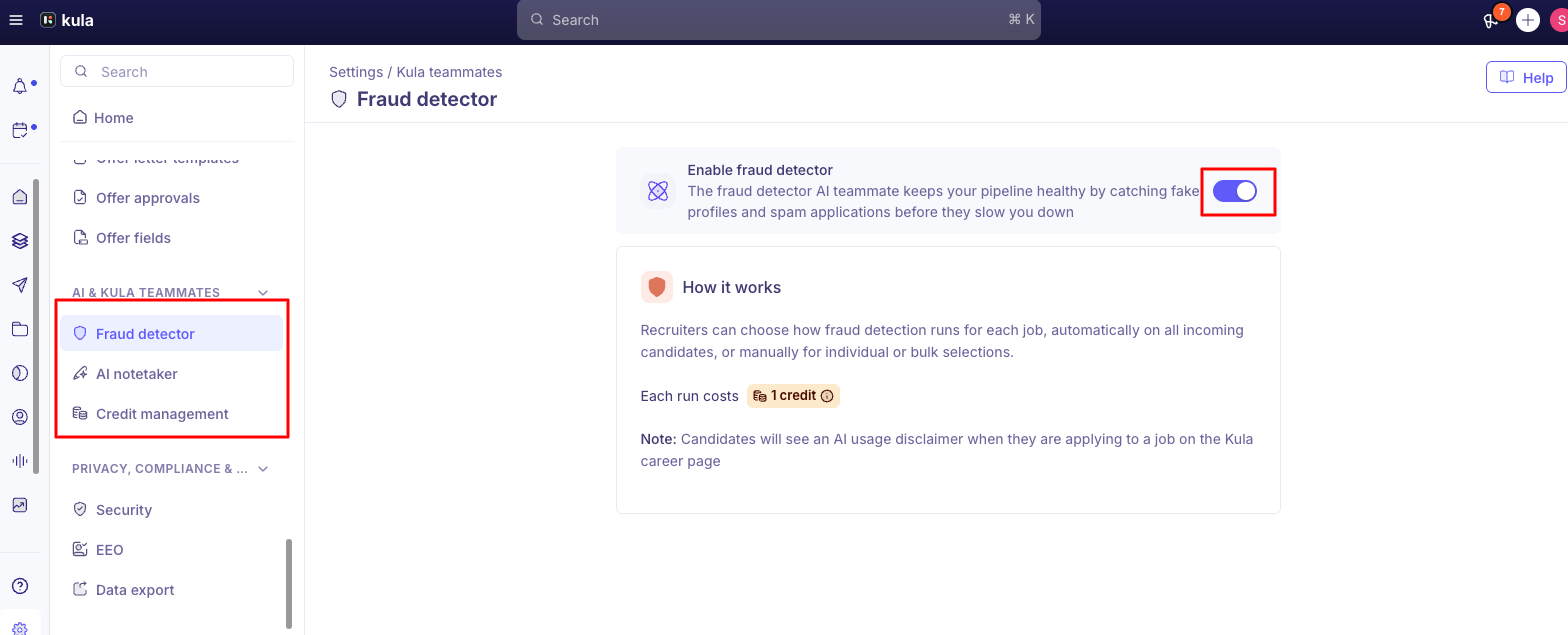
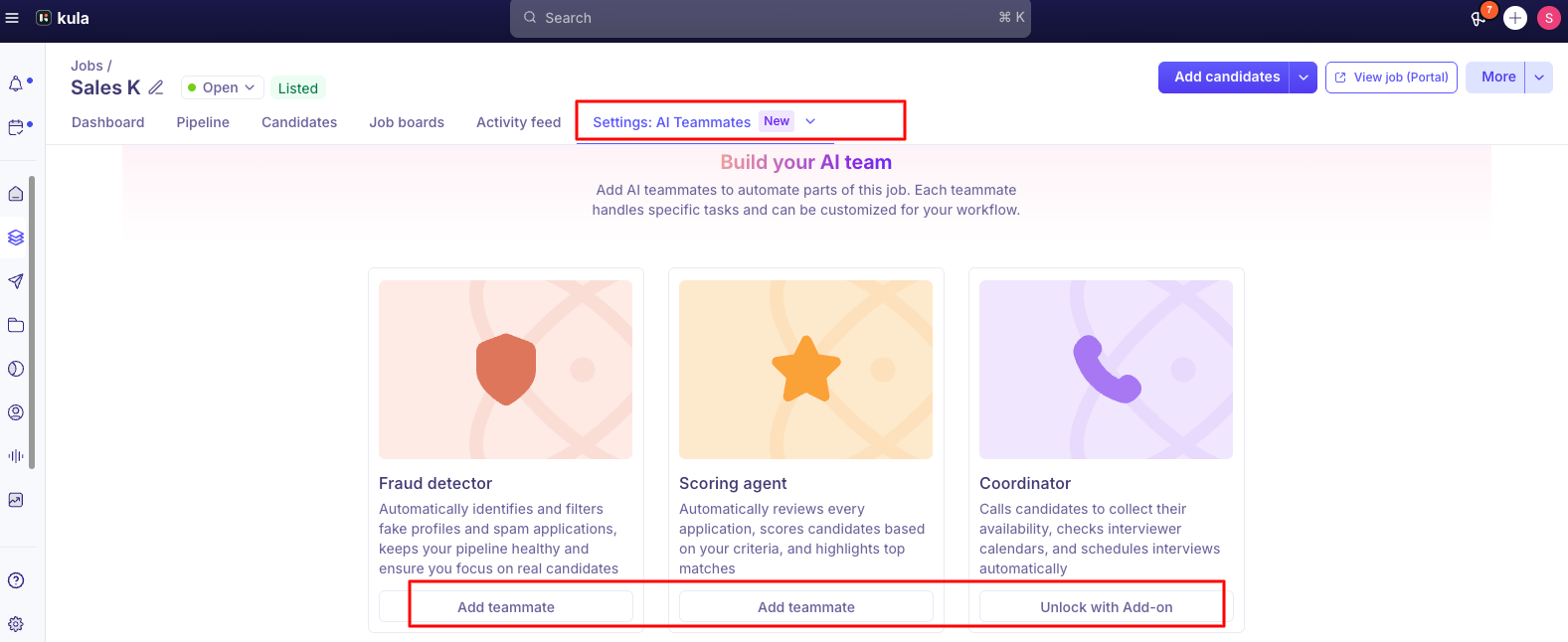
Who can do this: Super Admins and Admins turn Teammates on for the organization. Adding a Teammate to a job, or setting up AI scoring on a job, is open to Super Admins, Admins and Recruiters who can edit that job. Where to find it: organization setup: Settings → AI Teammates. Per job: the job → AI Teammates.
Kula Teammates: the three agents
Fraud detector
Checks each applicant for fake email addresses, known fraud patterns and other suspicious signs, and returns No issues, Inconclusive or Suspicious with a written explanation. It never rejects anyone unless you turn on automatic rejection of Suspicious candidates. A paid add-on. See Setting up and using the Fraud Detector.
Screener (AI Scoring)
Reads every application against criteria you set for the job and scores candidates, so the strongest matches rise to the top. Screener and AI Scoring are the same feature. It's set up per job, with no organization-level settings page. See Setting up AI screening criteria.
Coordinator
Calls candidates to schedule interviews. It introduces itself, checks availability against interviewer calendars, books the interview and sends the invitations, all in one call. It tries again if no one answers, candidates can call it back, and it can follow up on no-shows. Every call is recorded and transcribed on the candidate's record. A paid add-on, and you need at least one phone number for it to call from. See Setting up the Coordinator Agent.
Two switches for every Teammate
A Teammate only works when it's turned on in both places: for the organization (Settings → AI Teammates) and on the job (the job's AI Teammates tab). Turning it on for the organization doesn't start it on any job by itself. See Configuring the AI teammates for the Job.
Every AI feature in Kula
Feature | What it does | Acts on its own? |
|---|---|---|
Fraud detector | Flags applications that look fake or suspicious | Only if you turn on auto-reject for Suspicious |
Screener (AI Scoring) | Scores applications against your criteria | Only if you use its score in an auto-rejection rule |
Coordinator | Calls candidates and books interviews | Yes, once you turn it on for a job |
AI Notetaker | Joins Google Meet and Teams interviews, transcribes them and can fill in scorecards from the transcript. See Setting up the AI Notetaker | No |
AI Application Assistant | Summarizes a candidate on their profile and answers questions about them, with links to the source (scorecards, emails, notes, transcripts). It follows existing permissions and only covers the current job. It doesn't recommend whether to hire | No |
Resume parsing and autofill | Reads an uploaded resume (PDF or DOCX work best) and fills in parts of the application form or profile. See The candidate-facing application experience | No |
AI-generated messages | Writes role- and industry-specific outreach messages in flows | No |
Ask AI for job descriptions | Drafts a job description for you to edit when you create a job | No |
AI candidate search | Lets you search your candidates in plain language, for example "candidates from Chennai with a SaaS background" | No |
Conversational Analytics | Answers questions about your hiring data in plain English. See Conversational Analytics | No |
Not AI: auto-rejection rules and knockout questions are fixed rules (if an answer matches a condition, reject). They work the same way every time and don't use AI, so leave them out of the AI section of a security questionnaire. See Auto-rejection rules and knockout questions.
Telling candidates about AI
The Fraud detector adds its own notice. When it's on for a job, a line saying you use AI to screen for fraud is added to that job's application page.
For everything else, add it yourself. Mention AI use in the job description, or add a Yes/No consent question to the application form (the job → Job Post → Application Form → Add Section → Add Question).
Coordinator calls are recorded and transcribed, and both are visible on the candidate's record.
For data handling and compliance, see AI data privacy and candidate consent. Kula's independent AI audit, including an EU AI Act page, is at trust.warden-ai.com/kula/ai-scoring.
Good to know
Screener and AI Scoring are the same feature. Newer parts of the product say Screener; older ones say AI Scoring.
The Fraud detector and the Coordinator are paid add-ons. Kula support turns them on for your account. Ask your Kula account manager what your plan includes.
AI scoring depends on resume parsing. If scores look wrong or missing, check the candidate's resume was parsed correctly.
Check unexpected scores. Treat a surprising AI score as a prompt to look at the application, not as a decision.
Structured scorecards get better AI notes. The Notetaker fills in competency-based scorecards more reliably than a single general feedback field.
Nothing rejects a candidate by default. An AI feature only rejects someone if you've set it up to.
FAQ
Is Screener different from AI Scoring? No. It's the same feature under two names.
Which AI features cost extra? The Fraud detector and the Coordinator. Ask your Kula account manager about your plan.
Can a Hiring Manager set up AI Scoring for their job? Not by default. Adding them to the hiring team as a Recruiter lets them, but also lets them edit the rest of the job.
Can I turn off AI for one question in a scorecard? No. You can turn AI off for a whole scorecard, but not for single questions.
Does the AI Notetaker work for phone interviews? No. It works with video interviews on Google Meet and Teams.
How do I get the Coordinator or Fraud detector? Contact Kula support to turn on the add-on. Then an admin sets it up in Settings → AI Teammates and adds it to jobs.
Can an AI feature reject a candidate without anyone reviewing them? Only if you've set it up to, for example the Fraud detector's auto-reject for Suspicious, or a rule based on the AI score. Neither is on by default.
Need help?
If you have questions about any of Kula's AI features, reach out to us at support@kula.ai or use the in-app chat.